Waterloo Region Housing properties are getting an upgrade!
Over the next several months, we will be replacing door locks for all units and common spaces at Waterloo Region Housing (WRH) properties. The new locks will improve how we manage access to buildings and common spaces and enhance safety and security for tenants.
This work is planned to be completed by July 2027.
Information for tenants
You will receive a notice of entry letter one week before the lock change date for your unit. This letter will include information about the project and what to do if you won’t be home during the lock change. It’s important that you let us know in advance if you will not be home, so we can make arrangements for you to receive your new keys. We will make sure you get your keys before we change the lock.
Why are we doing this?
- The new locks use a patented keyway system that improves how we manage access to buildings and common spaces across all WRH properties and offers enhanced safety and security for tenants.
- At apartment buildings, we are installing a new fob access system that uses a fob device for entry to the building, rather than a key. The fob system allows us to program and cancel fobs remotely and each fob is linked to an individual person.
What do you need to do?
- New keys will be provided to you on the scheduled lock change date.
- If you are home on the scheduled lock change date but you need to leave before the lock is installed, please find Facilities staff before you leave to receive your new keys. Facilities staff will be on site with a cart distributing keys on the scheduled lock change date. If you cannot locate staff, call 519-575-4400. We will make sure you get your keys before we change the lock.
- If you know you will not be home on the scheduled lock change date, please let us know in advance. Email wrhkeys@regionofwaterloo.ca or call 519-575-4400 and mention Work Order #25-066663 when you contact us.
Frequently Asked Questions
General
How many keys/fobs will tenants receive?
- Townhouses: 2–3 keys per unit (if you paid for more, we will match what you have).
- Apartments: 2 keys and 1 fob per tenant. The fob will be used to access the main lobby entrance and any other common area doors that are set up with fob access (each building is different).
- If you would like to request more keys/fobs (e.g. for your son/daughter, a PSW worker, etc.), you can do so when you collect your keys on the lock change date.
How do I order more keys/fobs?
- OPTION 1: On lock change day you can order more keys or fobs from facilities staff.
- OPTION 2: After lock change day, you can order more keys and fobs by sending an email to wrhkeys@regionofwaterloo.ca or call 519-575-4400. Please mention Work Order #25-066663 when you contact us.
- The fob will be linked to the leaseholder. If you require a fob to be assigned to anyone other than the leaseholder, you will need to provide the full name of the fob recipient, and it will be assigned to them.
What do I do if I lose my keys/fobs?
- There will be a cost of $150 for a lock change and $15 per key or door fob replacement (no change from the previous system).
- Call the Service First Contact Centre at 519-575-4400 to notify us if you have lost a key or FOB and to request a replacement. Please mention Work Order #25-066663 when you contact us.
- A lost fob will be deactivated. If you find your lost fob later, it cannot be used.
- A new fob can be picked up at the Welcome Space in Kitchener or Waterloo. The $15.00 replacement fee can be paid by cash or debit.
- Identification is required to pick up keys and/or fobs.
My key is very sticky and hard to turn, what should I do?
- When the lock and keys are brand new, it may be sticky for the first few tries. If you are having issues, try to wiggle the key, rather than forcing it. Over time, the locks will get worn in and easier to use.
How to use a fob
What is a fob?
- A fob is a device that allows you to tap on a card reader beside the door to unlock the door without a key.
- The door unlocks if the fob indicates you have permission to enter.
- Some rooms have limited opening hours and your fob will not work outside the hours of operation.
How do I use a fob?
- Hold the fob flat against the card reader for a moment to make full contact.
- When the light on the reader turns green, the fob has been accepted and the door unlocks. You may also hear a beep.
- Press the door to open it once you have seen the light turn green.
What if the power goes out?
- The front door will fail to open when there is a power outage. This means that the door will be unlocked while the power is out.
Correct use of fob
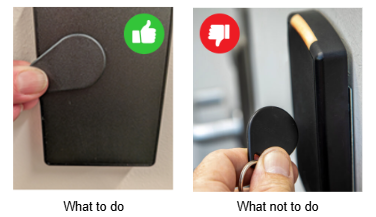
The fob should be held flat against the card reader or it will not work.